Set Up an Authenticated Proxy for the BotCity Tools
This guide shows how to provide the corporate authenticated proxy credentials to the BotCity Studio SDK tools (Wizard, BotRunner, BotCLI, BotStudio, Diagnostic) and to Python automations, so that installation, bot execution, and communication with the Orchestrator all pass through the network's authentication.
Minimum versions
In versions earlier than the ones listed below, the properties described in this guide are ignored.
- Wizard 3.4.0
- BotRunner 3.6.0
- BotCLI 2.2.0
- BotStudio 3.3.0
- Diagnostic 1.4.0
The proxy properties
The network requires a username and password for the proxy. Today this credential is already provided to pip with the --proxy parameter. The SDK's Java applications need exactly the same information, but provided as JVM properties. With the properties set, the tools send the credential to the proxy right on the first request (the same behavior as pip) and the connection is authorized.
There are eight properties. Fill in the four for https and repeat the same values in the four for http:
-Dhttps.proxyHost=proxy.company.com
-Dhttps.proxyPort=port
-Dhttps.proxyUser=user
-Dhttps.proxyPassword=password
-Dhttp.proxyHost=proxy.company.com
-Dhttp.proxyPort=port
-Dhttp.proxyUser=user
-Dhttp.proxyPassword=password
No username on your proxy?
If your proxy doesn't require authentication, don't set proxyUser/proxyPassword to empty values. In that case, remove the four *User and *Password properties entirely and keep only proxyHost and proxyPort. An empty value can still make the client send a blank credential, which some proxies reject outright. The same applies to the Python environment variables described further down: use http://host:port, with no user:password@ segment at all.
Alternatives for configuring the proxy properties
The same eight properties can reach the applications in two ways. Just one of the options is already enough, there's no need to do both.
Option A: per-application configuration, without using an environment variable
In this case, you need to create an .ini file next to each executable (.exe) and change one line in the Runner and CLI scripts.
1. .ini file next to the executables
Create the file wizard-3.4.0.l4j.ini next to wizard-3.4.0.exe with the following content:
-Dhttps.proxyHost=proxy.company.com
-Dhttps.proxyPort=port
-Dhttps.proxyUser=user
-Dhttps.proxyPassword=password
-Dhttp.proxyHost=proxy.company.com
-Dhttp.proxyPort=port
-Dhttp.proxyUser=user
-Dhttp.proxyPassword=password
Once the SDK is installed, this same strategy can also be used to start BotStudio with the appropriate properties. In this case, just create the file BotStudio.l4j.ini next to BotStudio.exe, with the same content as above.
2. Properties in the Runner and CLI startup scripts
In the SDK installation folder, edit the three scripts:
| File | Purpose |
|---|---|
BotRunnerBackgroundWrapper.bat |
Starts the Runner in the background |
BotRunner-gui.bat |
Starts the Runner with a UI |
BotCLI.bat |
Starts the command-line interface tool |
In each one, insert the properties between java and -jar. Before and after, for the Runner:
Before
After"%SCRIPTPATH%\win32\java\bin\java" -Dfile.encoding=UTF-8 "-Dhttps.proxyHost=proxy.company.com" "-Dhttps.proxyPort=port" "-Dhttps.proxyUser=user" "-Dhttps.proxyPassword=password" "-Dhttp.proxyHost=proxy.company.com" "-Dhttp.proxyPort=port" "-Dhttp.proxyUser=user" "-Dhttp.proxyPassword=password" -jar "%SCRIPTPATH%\bin\botrunner.jar"
Advantages:
- Doesn't create a machine-scoped variable.
- The credential stays restricted to the SDK applications.
- No other Java application on the machine is affected.
Disadvantages:
- Every update or new installation replaces the files and requires redoing the configuration.
- There are several files to maintain.
Option B: via the JAVA_TOOL_OPTIONS environment variable
This is the simplest alternative: a single environment variable at the machine scope, read automatically by any Java application.
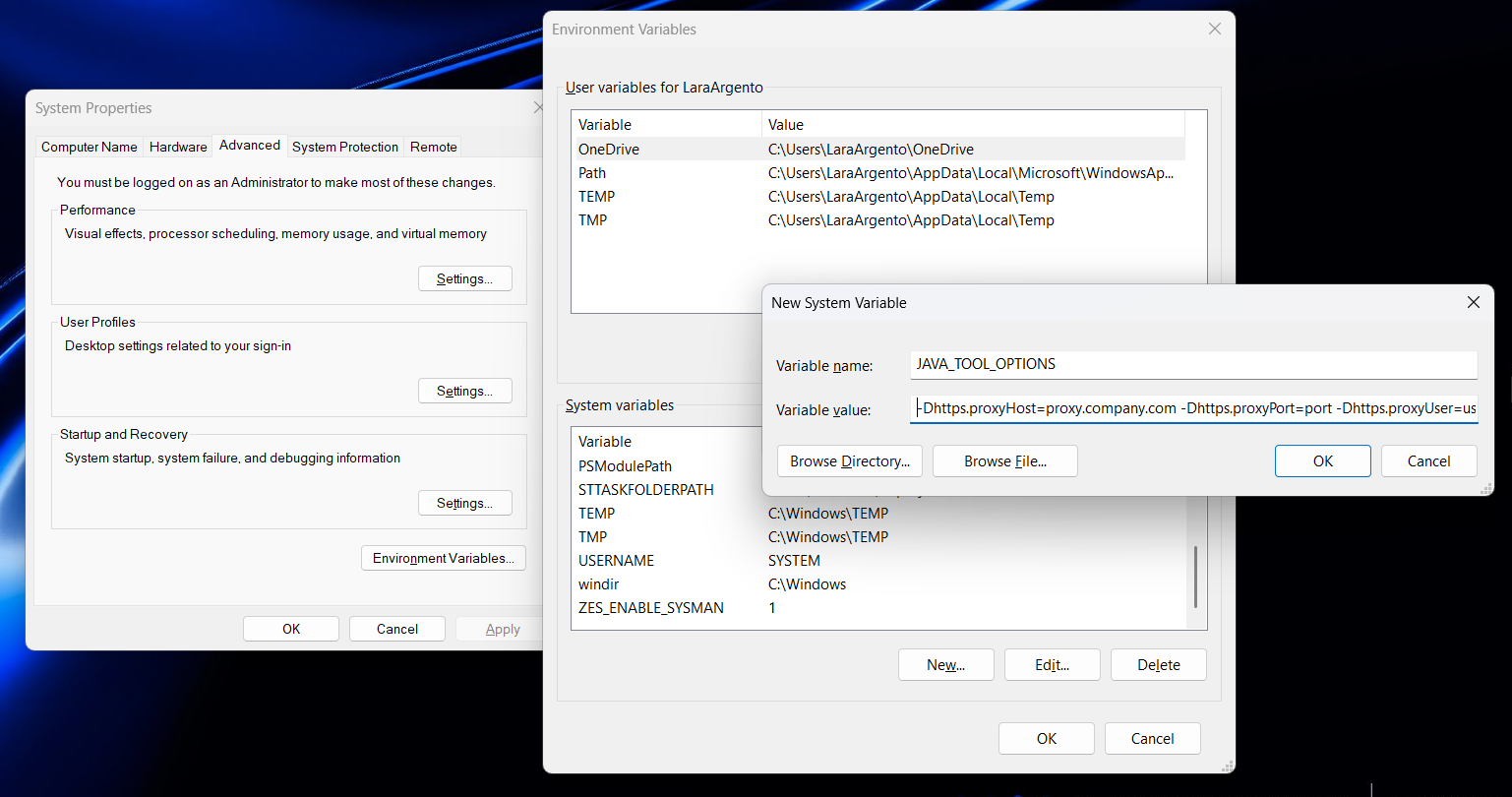
- Variable name:
JAVA_TOOL_OPTIONS - Variable value:
-Dhttps.proxyHost=proxy.company.com -Dhttps.proxyPort=port -Dhttps.proxyUser=user -Dhttps.proxyPassword=password -Dhttp.proxyHost=proxy.company.com -Dhttp.proxyPort=port -Dhttp.proxyUser=user -Dhttp.proxyPassword=password
Create the variable under System Properties → Environment Variables → System variables.
Restart after creating the variable
After creating the variable, close and reopen any terminal and restart the Runner, BotStudio, and the Wizard itself. Each process only reads the environment when it starts.
Advantages:
- Single configuration, applies to every tool.
- Survives SDK updates and reinstalls.
Disadvantages:
- It's a machine-scoped variable: it applies to every JVM on the server.
Python automations: replace --proxy with environment variables
Today, package installation is done with pip install --proxy http://user:password@proxy..., typed in manually. This needs to change for two reasons:
- It's the Runner that installs the bot's dependencies. Every time it prepares a bot it runs
pipa few times (updatingpip,setuptools,wheel, and then the package orrequirements.txt), and there's nowhere to type--proxy. - The bot's code also accesses the network. SDK calls such as
maestro.finish_task()ormaestro.alert(), used for integrations with the platform, can also fail proxy authentication if the credential isn't available. Thepip--proxyflag doesn't reach them.
Environment variables solve both cases at once. Create HTTP_PROXY and HTTPS_PROXY at the Machine scope, or at the scope of the user who runs the Runner. The value is exactly the same one that's currently passed to the --proxy flag, in the format http://user:password@host:port.
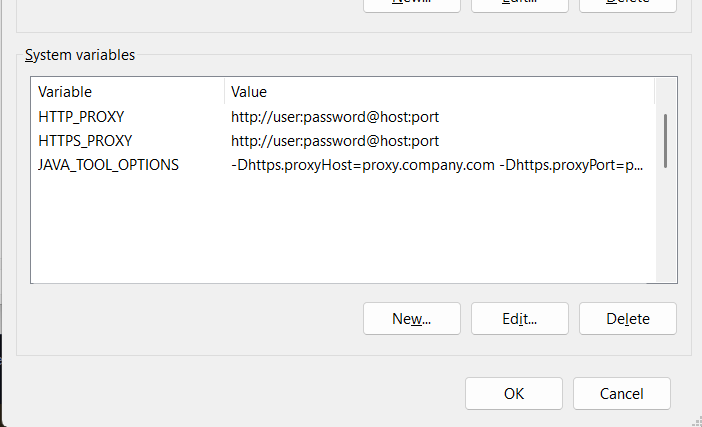
Restart the Runner after creating the variables
The Runner passes on to the bots and to pip the environment it received when it started.
Special characters in the password
Unlike the JVM properties, where the password is written as-is, here the username and password go inside a URL. Any reserved character needs to be encoded, or the URL is parsed incorrectly and authentication fails:
| Character | Write as | Character | Write as |
|---|---|---|---|
@ |
%40 |
# |
%23 |
: |
%3A |
& |
%26 |
/ |
%2F |
? |
%3F |
\ (domain) |
%5C |
% |
%25 |
Example: the username Lara with the password p@ss:2026 becomes http://Lara:p%40ss%3A2026@proxy.company.com:8080.
Virtual environments
Since HTTP_PROXY/HTTPS_PROXY are read directly by pip and by the requests library, they work for any venv, with no need for extra configuration per environment.
Troubleshooting
Runner login fails with status code 400
Login failed with status code: 400
The Runner log shows the messages below, and the Runner retries the login every 5 seconds without connecting to the Orchestrator:
Login failed with status code: 400
Failed to login with BotCity Orchestrator. We will retry in 5 seconds.
Obtaining an access token with BotCity Maestro.
This error means the proxy properties did not reach the Runner, either because they were not added to the Runner startup scripts (BotRunnerBackgroundWrapper.bat and BotRunner-gui.bat) or because they were added with incorrect formatting, for example outside the position between java and -jar, without quotes, or with a mistyped value.
To fix it: open these scripts and confirm that all eight properties are present, between java and -jar, in the same format shown in Option A. Fix anything missing or malformatted and restart the Runner. If you prefer not to edit the scripts, use Option B, which applies the properties to all tools at once.