Repositories
A repository is a set of resources that is available for access and handling only by specific groups.
Through this feature, you link automations, bots, credentials and other resources to a given repository, limiting the access of the users to only the information relevant to them.
This way, a set of resources is linked to a repository and can only be viewed or operated in the platform by the users of the groups that have access to it.
Each repository also has its own Attached runners. This way, you can use repositories to represent business areas or cost centers and define which Runners serve each area: a Runner can be exclusive to one repository or shared among several.
The link between Runner and repository does not restrict API calls
The link between Runners and repositories applies in the platform: it defines what appears on the screens, which Runners an automation can use and what is displayed in Resource Allocation.
It does not restrict the API calls that the Runner makes while executing a task, such as access to credentials, datapools and result files. The Runner authenticates with the workspace key, so a running bot can access resources from other repositories through these calls.
The separation of visibility between areas in the platform depends on the groups and permissions configured in the workspace.
View
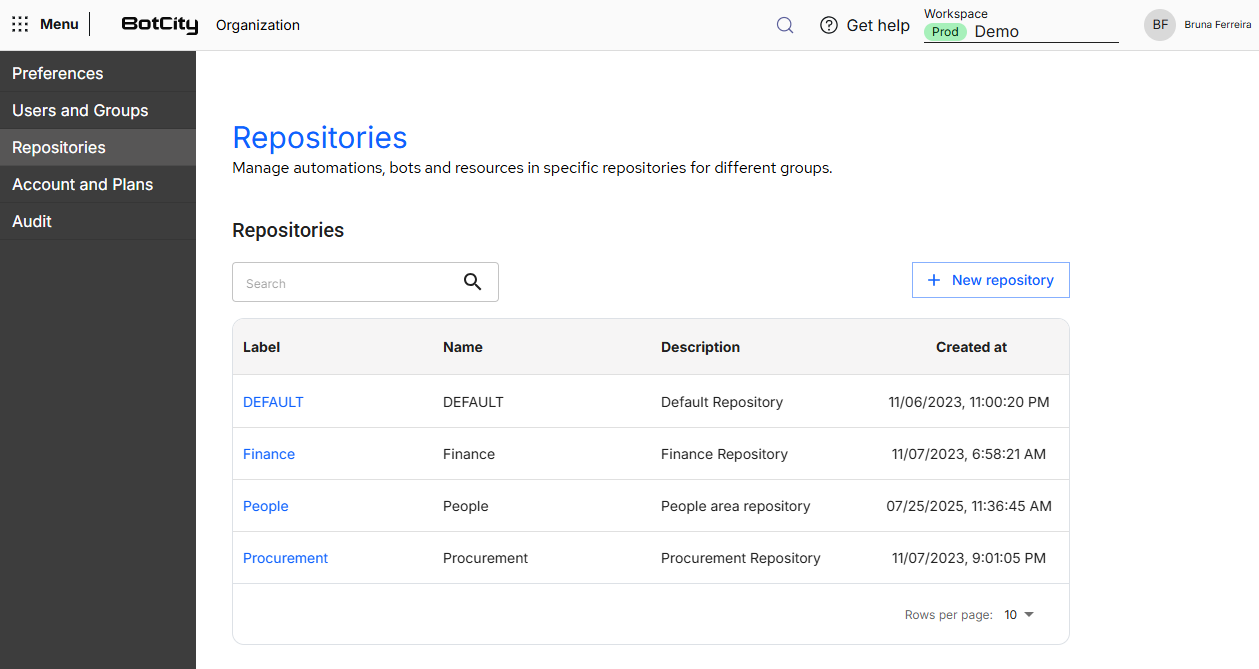
In the Repositories menu, you find all repositories created for your workspace, with the following information in columns:
- Label: unique identifier of the repository within the workspace.
- Name: display name of the repository, defined at creation time.
- Description: free text explaining the purpose of the repository, such as the area or the team it serves.
- Created at: date and time when the repository was created.
Above the table are the search field and the New repository button.
DEFAULT repository
Every workspace has a default repository with the DEFAULT identifier, and it cannot be edited or deleted.
Resources created without indicating another repository are linked to it.
Create a repository
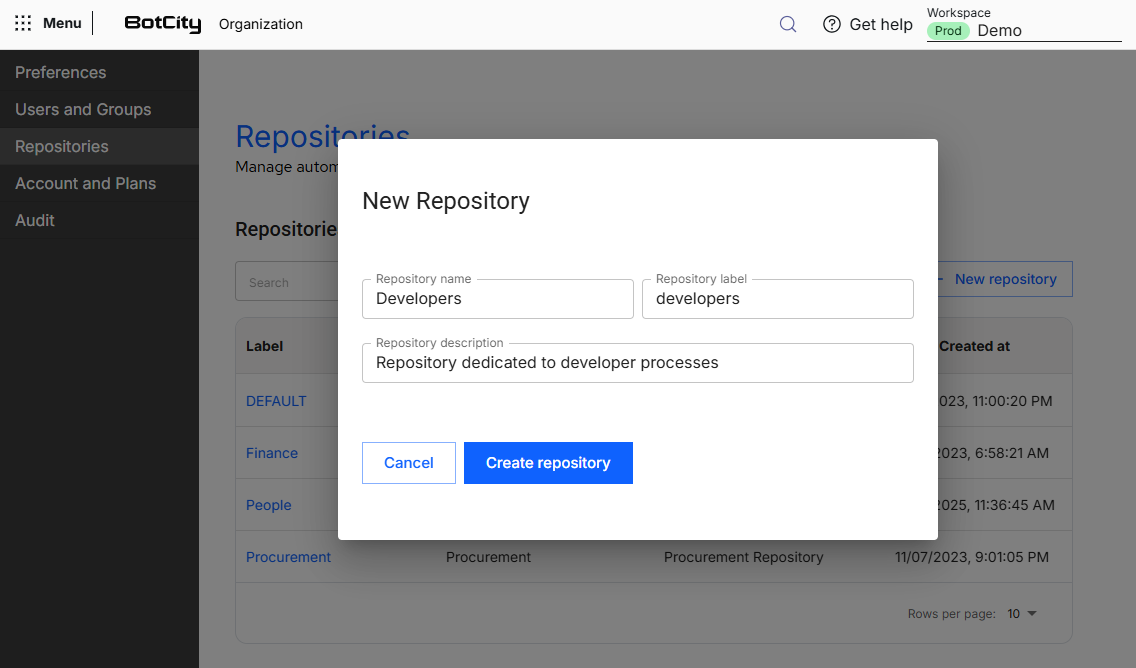
To create a repository, click the New repository button and fill in the form:
- Repository name: display name of the repository, used to identify it in the table.
- Repository label: unique identifier of the repository within the workspace, used to reference it in the platform.
- Repository description: free text explaining the purpose of the repository, such as the area or the team it serves.
- Attached runners:
optionalRunners that can execute the automations of this repository. By default, all Runners of the workspace are selected.
The Create repository button is enabled when all required fields are filled in with valid values. When you click it, the new repository is created and added to the list of repositories of the workspace.
Repository label
The label is defined at creation time and cannot be changed afterwards.
Repository without Runners
You can create a repository without any attached Runner, for example, before having Runners created in the workspace. Runners can be attached later, by editing the repository or by editing the Runner.
Repository information
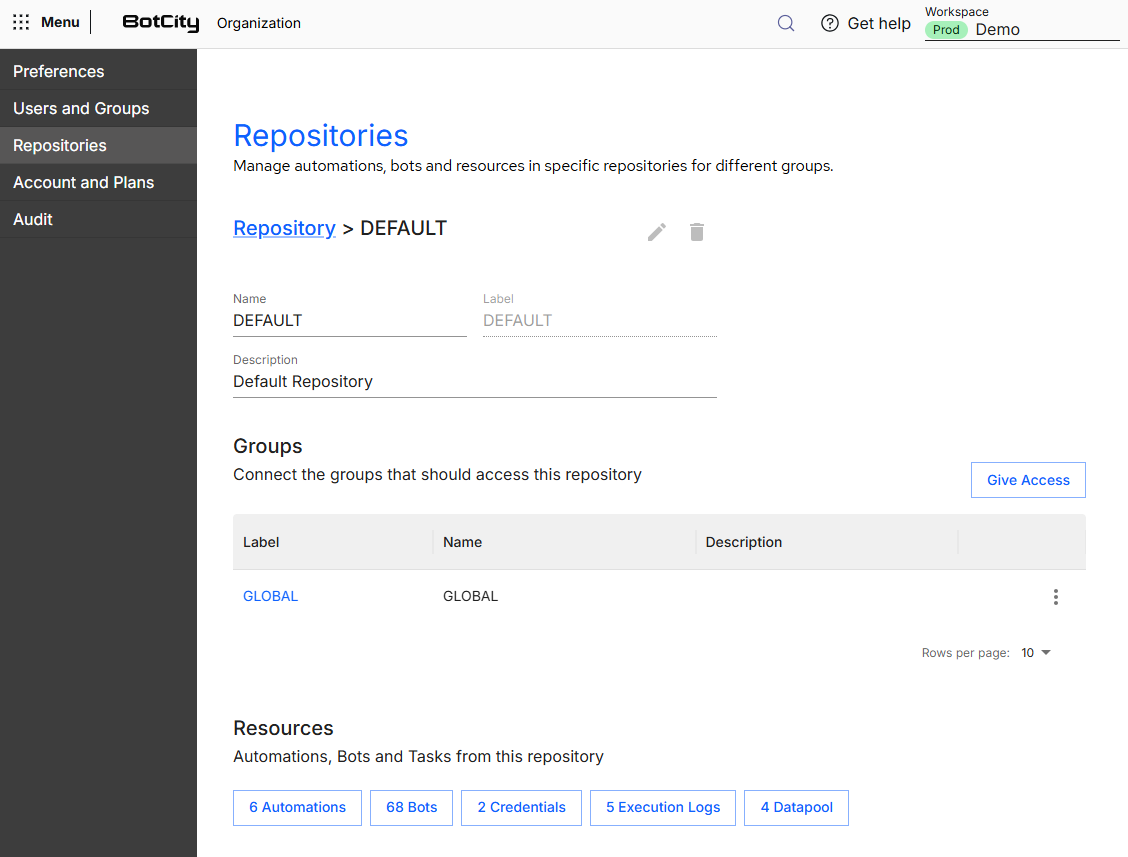
To open the information of a repository, click its label in the Repositories table.
On this screen you find:
- Repository data: the name, the label, the description and the Runners attached to the repository.
- Delete and Edit buttons: in the upper right corner of the screen, they allow removing the repository from the workspace or changing its data.
- Groups: table with the groups that have access to the repository, in the Label, Name and Description columns, plus the options menu and the
Give Accessbutton. - Resources: shortcuts to the resources linked to the repository, such as Automations, Bots, Runners, Credentials, Execution Logs and Datapools.
Edit a repository
To edit a repository, click the Edit button in the upper right corner of the repository information screen.
You can change the following fields:
- Repository name
- Repository description
- Attached runners
The Repository label cannot be changed, because it is the repository identifier.
Add Runners to the repository
You can add Runners to the repository freely. If the added Runner is already attached to other repositories, it becomes shared among all of them.
Remove Runners from the repository
You cannot remove a Runner from the repository while there are automations of this repository using that Runner.
The validation happens when you click Save. If any removed Runner is linked to automations of the repository, a window informs that the removal is not possible and lists the automations blocking the change. When there are more than five automations, click Show more to see the full list. The Go to automations button opens the Automations menu already filtered.
To complete the removal:
- Unlink the Runner from the listed automations, editing each automation.
- Go back to editing the repository and remove the Runner.
No changes are saved when there is a block
The validation applies to the whole edit. If you removed more than one Runner and only one of them has linked automations, none of the changes is saved.
There is no automatic migration of the automations along with the Runner. This choice prevents automations of one area from starting to use Runners of another area without you noticing.
Delete a repository
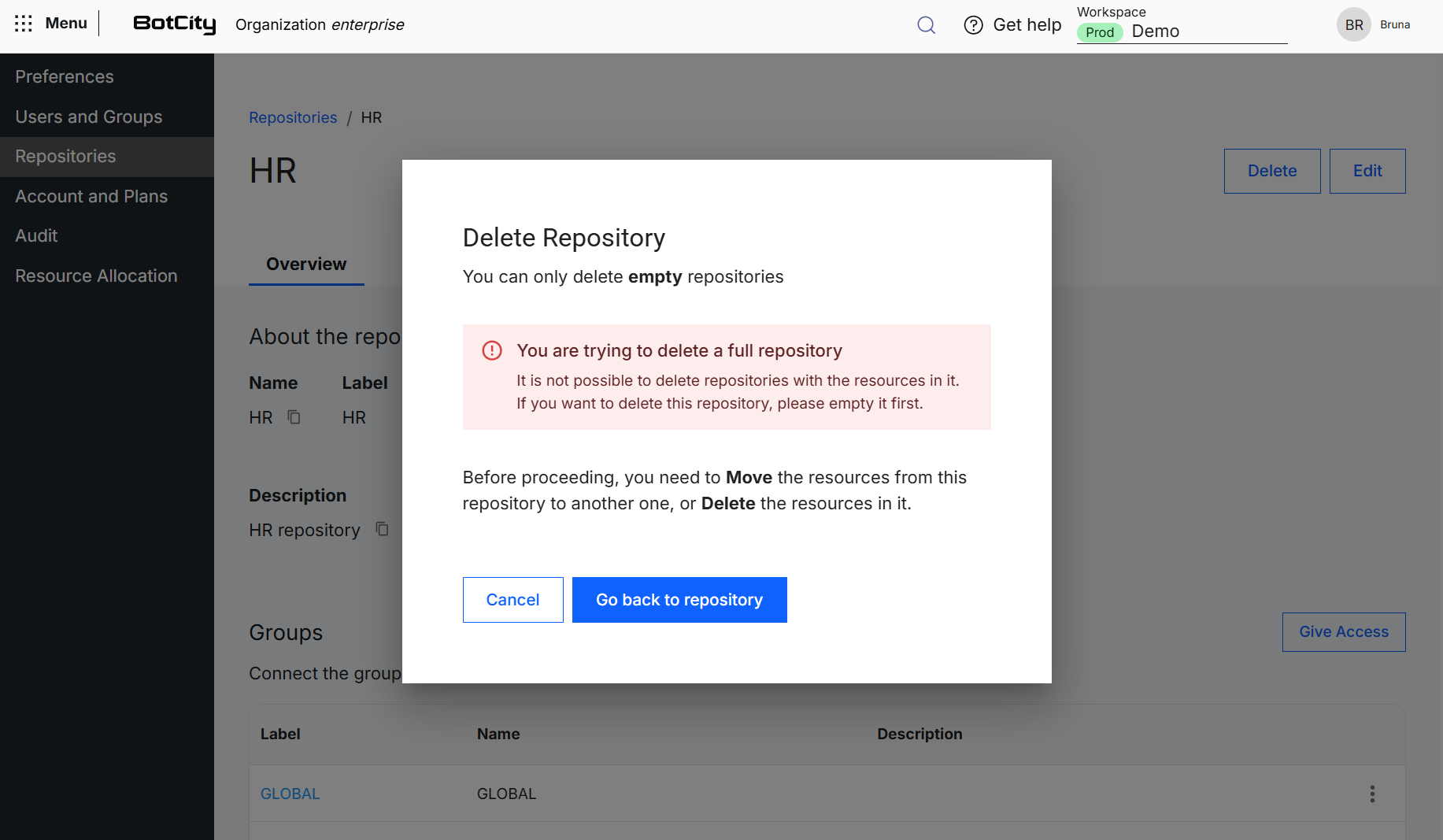
To delete a repository, click the Delete button in the upper right corner of the repository information screen.
You can only delete an empty repository. If there are still resources linked to it, a window informs that the deletion is not possible and guides you to move the resources to another repository or delete them before proceeding.
Give access to a group
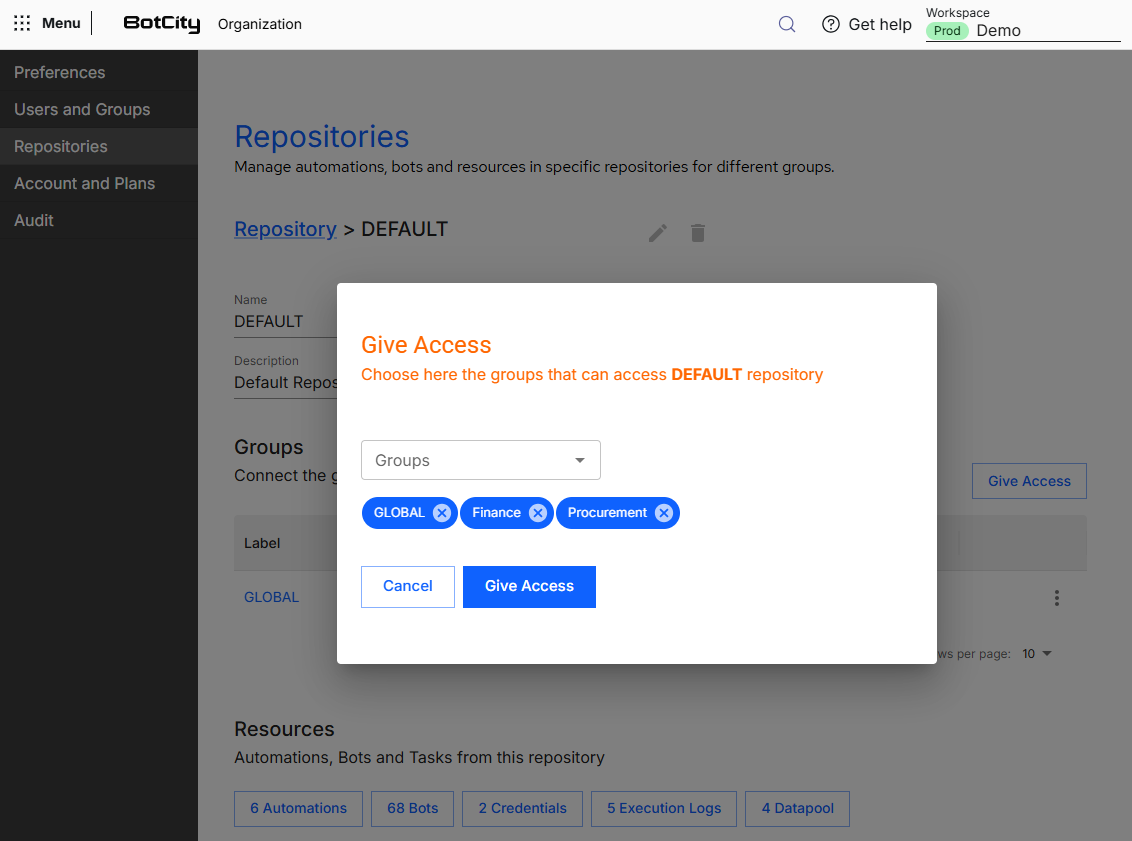
On the repository information screen, click the Give Access button to open the form.
In the Groups field, select all groups that will have access to the resources linked to this repository. Each selected group appears as a tag below the field and can be removed through the close icon.
When you confirm the action by clicking Give Access, the selected groups start being displayed in the Groups table of the repository, and the users of these groups start viewing and operating the resources linked to it.
Manage the workspace groups
The groups that appear in this form are the same ones created in the Users and Groups section.
See more at:
Link resources to a repository
When creating new resources in the BotCity Orchestrator, such as Automations, Execution Log and Credentials, you define which repository this resource will be linked to, through the Repository field.
This way, the resource is contained in the configured repository, and only the users of the groups with access to this repository can view it in the platform.
With the repository created and the resources properly configured, you can also use the Repository filter in the other Orchestrator features to consult only the resources of a specific repository.
Link Runners to a repository
Unlike the other resources, a Runner can be linked to one or more repositories. You define this link in two ways:
- Through the repository: in the Attached runners field, when creating or editing the repository.
- Through the Runner: in the Linked repositories field, when creating or editing the Runner. See more at Runners.
Track the distribution of Runners
An automation can only use Runners linked to its repository. To separate the execution capacity between areas, review the Runners attached to each repository.
To see how many Runners and automations each repository has in relation to the contracted total, access Resource Allocation.