March
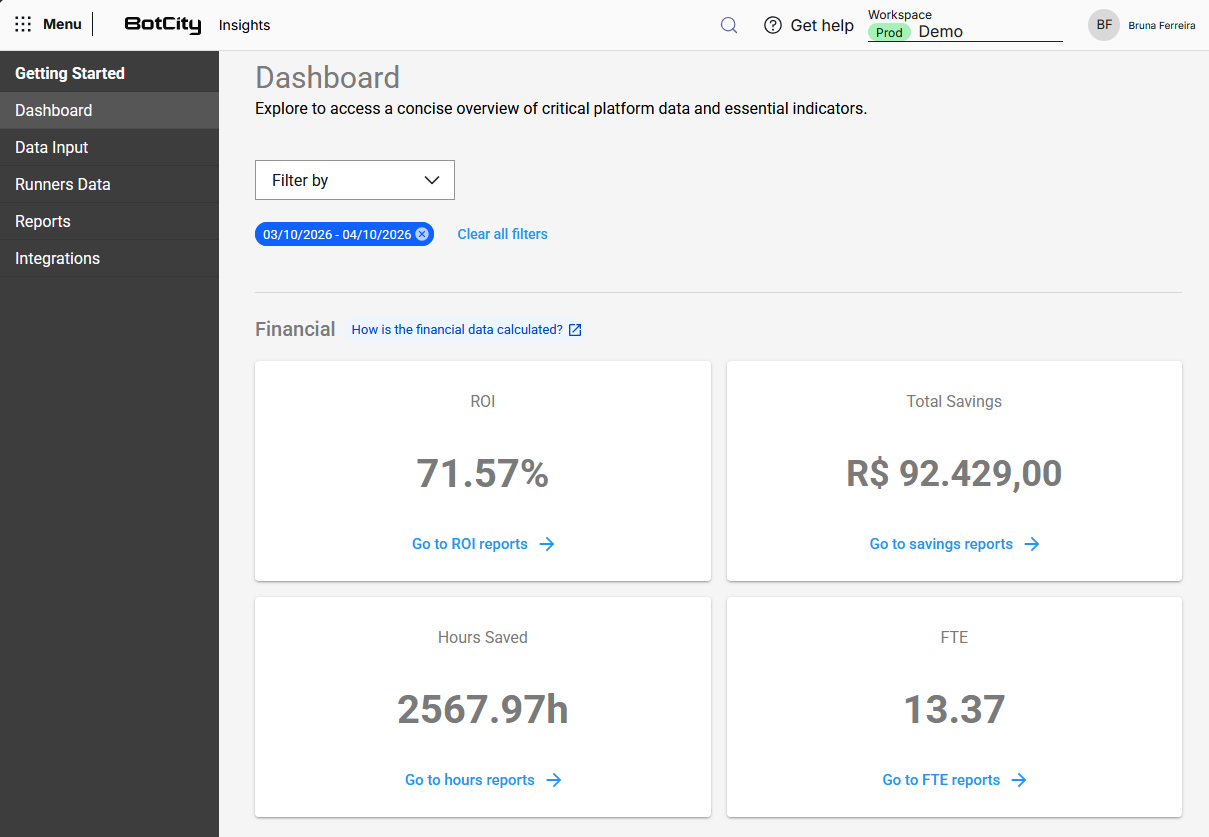
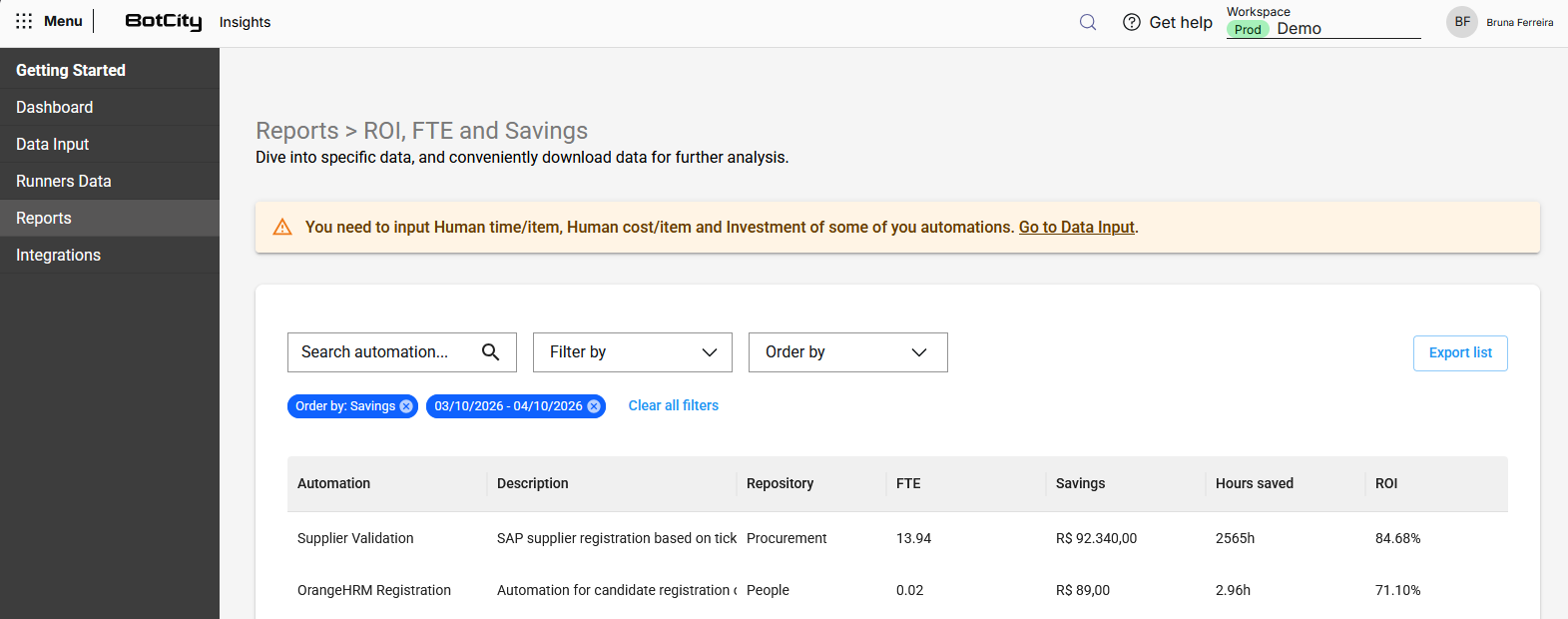
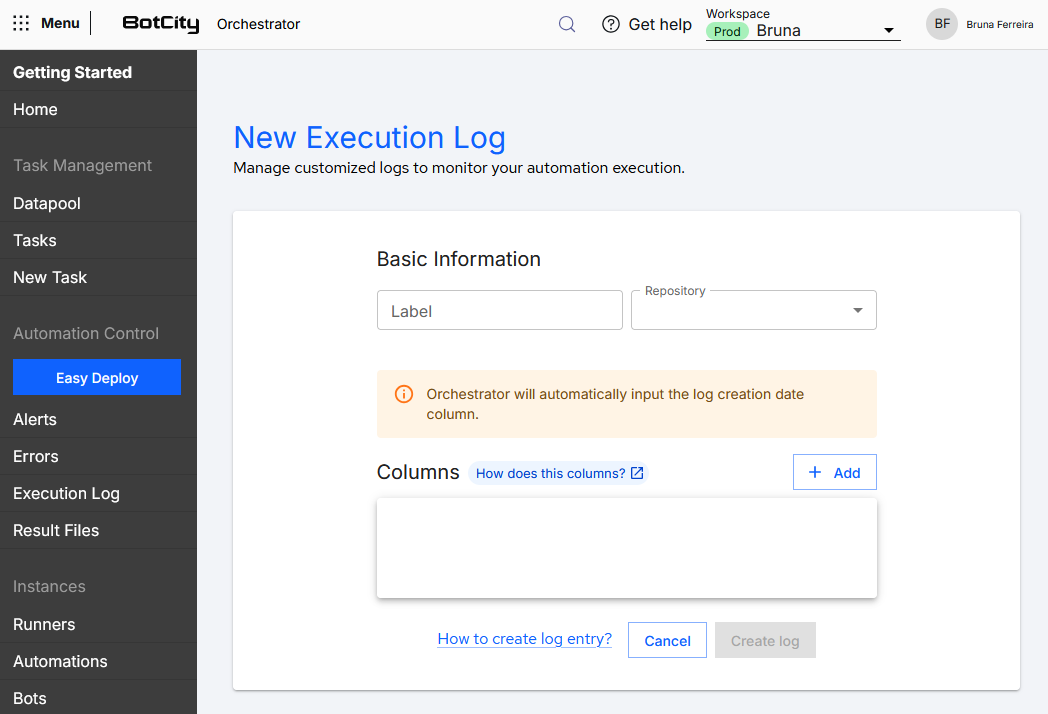
In March 2026, the BotCity Orchestrator news includes improvements to filters across multiple screens with standardized behavior and the addition of text search by automation and repository. Runners have been unified, eliminating the distinction between Desktop and Background types. The Snippet Generator received adjustments to code blocks with more accurate usage suggestions, and the Execution Log screen gained a new informational alert about the automatic creation of the date column. Finally, BotCity Insights introduces a new card on the dashboard showing the number of hours saved in the selected period, also available in individual reports by automation.
Filters — Minor improvements
Overview
This release updates the filter experience across multiple screens of the BotCity Orchestrator. The goal is to standardize filter behavior and expand search and sorting options in listings.
The modules included are:
- Datapool
- Tasks
- New Task
- Alerts
- Errors
- Execution Log
- Result Files
- Runners
- Automations
- Bots
- Scheduling
- Credentials
Note
All automation and repository filters will now have a text search mechanism.
Filter behavior pattern
The filters in this release follow four interaction patterns:
Single selection via dropdown: Some modules use a simple dropdown, where the user selects one criterion at a time.
Multiple selection via checkbox: Some modules allow selecting multiple values within the same filter.
Free text search field: Some modules have a search field directly by text.
Separate sorting: All modules have "Sort by" separate from "Filter by", allowing filter and sorting to be applied simultaneously.
Modules
Tasks
Location: Task Management › Tasks
Filters:
| Field | Type | Description |
|---|---|---|
| Search | Free text | Search by task ID |
| Filter by | Dropdown | Filters the listing by criteria |
| Sort by | Dropdown | Sorts the listing |
Filter by options::
- Automation: Selection of one or more automations, with text search option
- Date: Selection of time period
- Repository: Selection of a repository with text search option
- Runner: Selection of a Runner
- State: Selection of a task state
Running·Waiting·Finished·Partially finished·Failed
Sort by options::
- Most recent first
- Oldest first
Available columns in the task list:
- ID
- State
- Runner | Status
- Automation Name
- Priority
- Last Update
- Username
- Creation Date
- Processed items
- Failed items
- Completion message
- Report items
- Repository
- Actions
New Task
Location: Task Management › New Task
Filters:
| Field | Type | Description |
|---|---|---|
| Search | Free text | Search by automation name or label |
| Filter by | Dropdown | Filters the listing by criteria |
| Sort by | Dropdown | Sorts the listing |
Filter by options::
- Bot ID: Selection of a bot
- Label: Selection of one or more automations
- Name: Selection of one or more automations
- Repository: Selection of a repository with text search option
Sort by options::
- Alphabetically
- Most recent first
- Oldest first
Available columns in the task list:
- Icon
- Automation Name
- Automation Label
- Description
- Bot ID
- Repository
- New Task button
Alerts
Location: Automation Control › Alerts
| Field | Type | Description |
|---|---|---|
| Task ID | Free text | Search by task ID related to the alert |
| Filter by | Dropdown | Filters the listing by criteria |
| Sort by | Dropdown | Sorts the listing |
Filter by options::
- Automation: Selection of one or more Automations
- Period: Selection of time period
Sort by options::
- Most recent first
- Oldest first
Available columns in the Alerts list:
- Error ID
- Task ID
- Date
- Error Type
- Message
- Automation
- Version
Errors
Location: Automation Control › Errors
| Field | Type | Description |
|---|---|---|
| Search | Free text | Search by task ID related to the error |
| Filter by | Dropdown | Filters the listing by criteria |
| Sort by | Dropdown | Sorts the listing |
Filter by options::
- Automation: Selection of one or more Automations
- Period: Selection of time period
Sort by options::
- Most recent first
- Oldest first
Available columns in the Errors list:
- Error ID
- Task ID
- Date
- Error Type
- Message
- Automation
- Version
Execution Log
Location: Automation Control › Execution Log
| Field | Type | Description |
|---|---|---|
| Filter by | Dropdown with multiple checkbox | Selects multiple values |
| Sort by | Dropdown | Sorts the listing |
Filter by options::
- Label: Selection of one or more Logs
- Repository: Selection of a specific repository
Sort by options::
- Alphabetically
- Most recent first
- Oldest first
Available columns in the Execution Log list:
- Label
- Date
- Repository
- Actions
Result Files
Location: Automation Control › Result Files
| Field | Type | Description |
|---|---|---|
| Filter by | Dropdown | Filters the listing by criteria |
| Sort by | Dropdown | Sorts the listing |
Filter by options::
- Automation: Selection of one or more automations
- Repository: Selection of a specific repository
- Period: Selection of time period
Sort by options::
- Most recent first
- Oldest first
Available columns in the Result Files list:
- Name
- Automation
- Date
- Repository
- Download
Runners
Location: Instances › Runners
| Field | Type | Description |
|---|---|---|
| Machine ID | Free text | Search by machine ID |
| Filter by | Dropdown with multiple checkbox | Selects multiple values |
| Sort by | Dropdown | Sorts the listing |
Filter by options::
- Name: Selection of one or more Runners
- Status: Selection of status
Online·Offline
Sort by options::
- Active first
- Inactive first
- Most recent first
- Oldest first
Available columns in the Runners list:
- Screenshot
- Name
- Label
- Status
- Last update
Automations
Location: Instances › Automations
| Field | Type | Description |
|---|---|---|
| Search | Free text | Free search in the listing |
| Filter by | Dropdown with multiple checkbox | Selects multiple values |
| Sort by | Dropdown | Sorts the listing |
Filter by options::
- Label: Selection of one or more Automations
- Name: Selection of one or more Automations
- Repository: Selection of a specific repository
Sort by options::
- Alphabetically
- Most recent first
- Oldest first
Available columns in the Automations list:
- Icon
- Name
- Label
- Description
- Bot ID
- Repository
- Warning
- Actions
Bots
Location: Instances › Bots
| Field | Type | Description |
|---|---|---|
| Search | Free text | Free search in the listing |
| Filter by | Dropdown with multiple checkbox | Selects multiple values |
| Sort by | Dropdown | Sorts the listing |
Filter by options::
- Bot ID: Selection of one or more Bots
- Repository: Selection of a Repository
- Technology: Selection of the development technology
Python·JavaScript·Java·Command
Sort by options::
- Alphabetically
- Most recent first
- Oldest first
Available columns in the Bots list:
- Bot Id
- Version
- Last Deploy
- Release Version
- Technology
- Repository
- Actions
Scheduling
Location: Operation Tools › Scheduling
| Field | Type | Description |
|---|---|---|
| Filter by | Dropdown | Filters the listing by criteria |
| Sort by | Dropdown | Sorts the listing |
Filter by options::
- Automation: Selection of one or more automations
- Name: Selection of one or more schedules
- Status: Selection of scheduling status
active·inactive
Sort by options::
- Alphabetically
- Most recent first
- Oldest first
Available columns in the Scheduling list:
- Name
- Automation
- Rule
- Parameter
- Status
- Actions
Credentials
Location: Operation Tools › Credentials
| Field | Type | Description |
|---|---|---|
| Filter by | Dropdown | Filters the listing by criteria |
| Sort by | Dropdown | Sorts the listing |
Filter by options::
- Name: Selection of a credential
- Repository: Selection of a Repository
Sort by options::
- Alphabetically
- Most recent first
- Oldest first
Available columns in the Credentials list:
- Label
- Date
- Repository
Runners
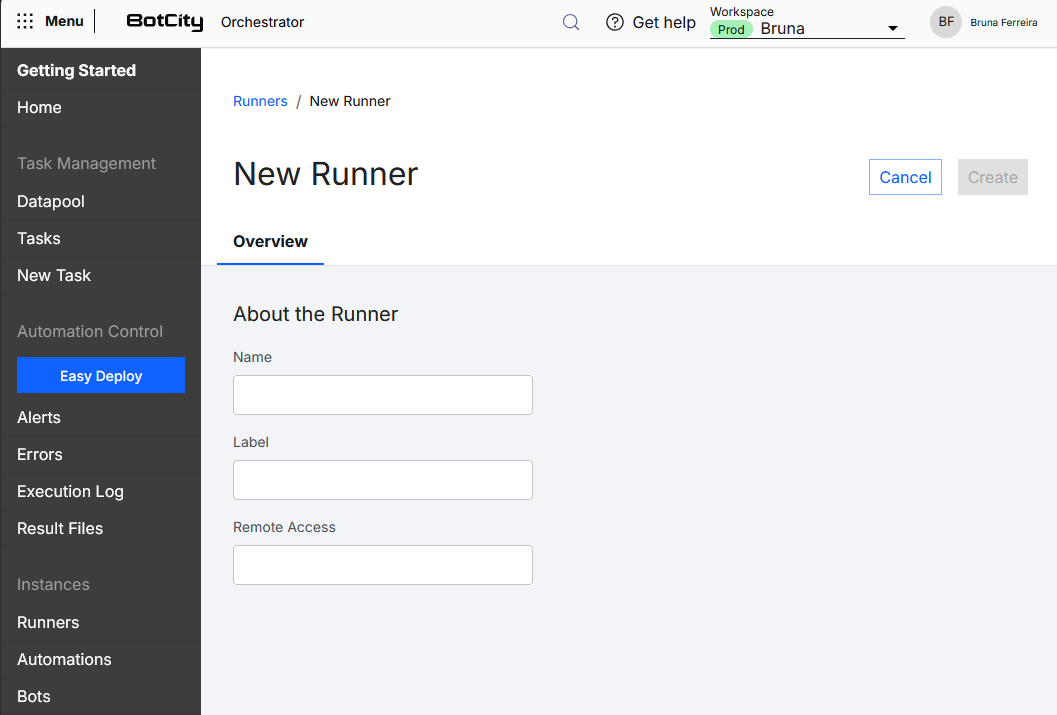
Runners have gone through a type unification process. The distinction between Desktop and Background Runners no longer exists; each Runner can run both types of automations.
Other improvements were applied at the time of creating and editing a Runner, leaving only the necessary settings:
- Name: Friendly name for Runner identification
- Label: unique identifier
- Remote Access:
(optional)IP address of the machine where the Runner is allocated.
Snippet Generator
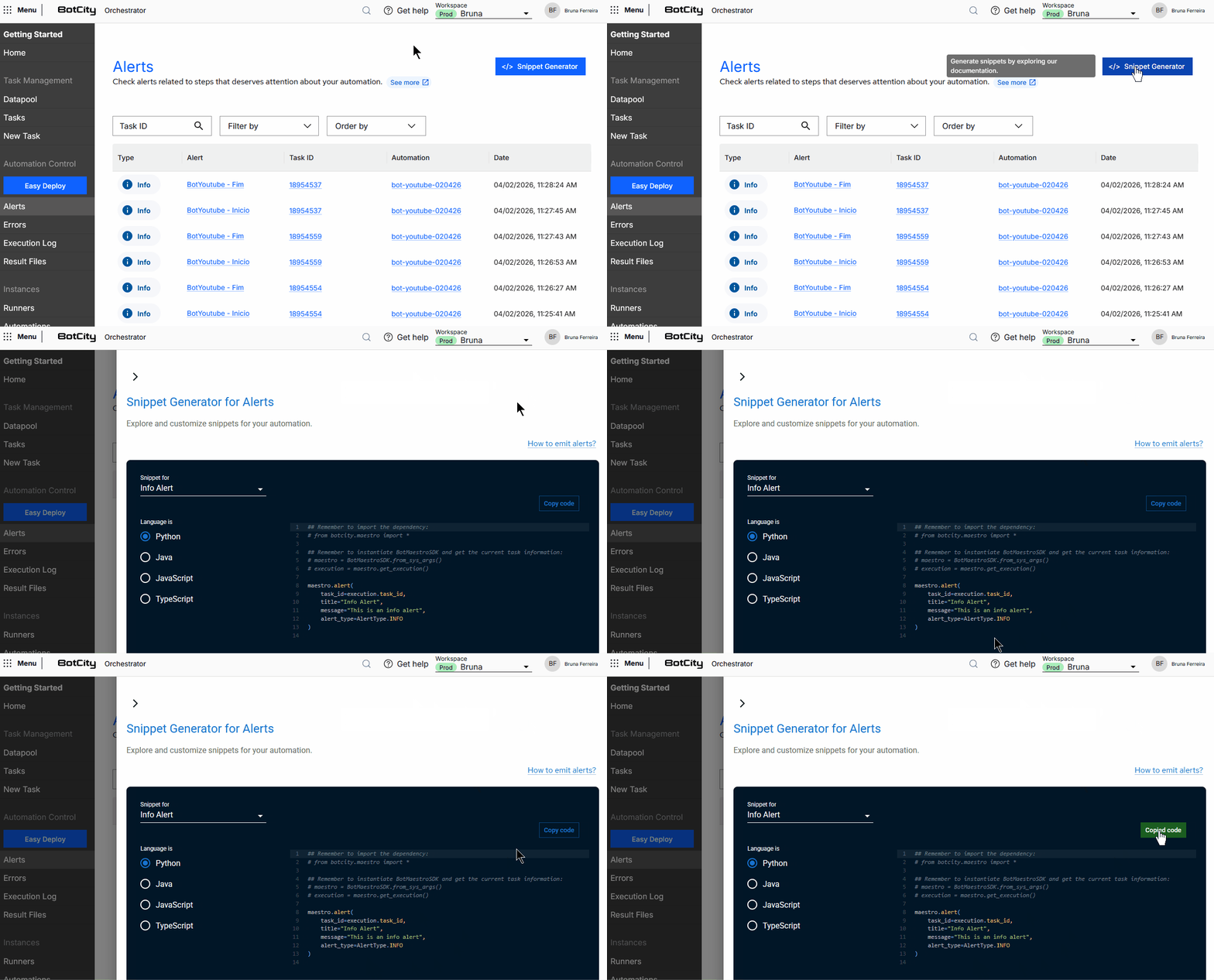
When accessing features in the BotCity Orchestrator, you will find a Snippet Generator button providing implementation examples using the SDK.
The code blocks have been adjusted, bringing more accurate usage suggestions.
Execution Log
Improvement on the creation screen for a new Execution Log.
The alert informs that the date column is automatically created and recorded with each new data entry in the Execution Log.
BotCity Insights
In the BotCity Insights module, a new card is available on the dashboard indicating the number of hours saved for the period selected in the filter. This report is also available in individual reports, separated by automation.