Data Input
In the "Data Input" section you can configure and enter the input values for each automation. These values will be used as the basis for calculating results and building dashboards.
Who has access?
The Data Input section is accessed and values configured only by users with the Administrator or Manager role.
See more at:
Item
BotCity Insights uses the number of items that a task executed as the basis for calculations. This will be an essential unit for performance calculation and financial data.
You can understand an "item" as something that was produced by the automation, and that in some way generated an "output".
Item examples
- an approved supplier
- a product registered in a given system
A single task execution can process more than one item, depending on the business rules and the process performed by the bot.
Finance
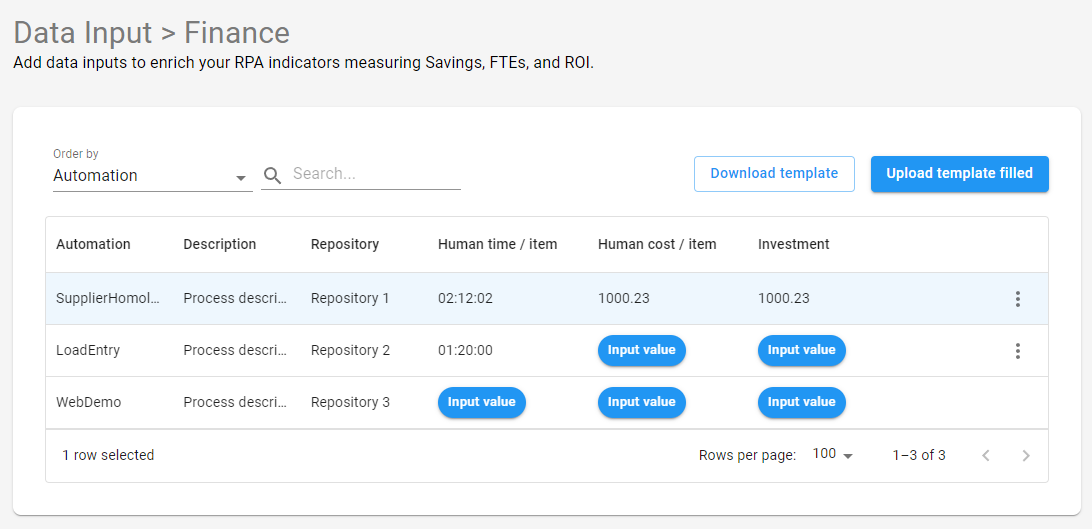
To correctly calculate high-level results, it is necessary to access the Data Input > Finance page and enter these input values for each automation:
- Human time / item: The time a human would take to process a single item of the automation. You can enter this value in hours, minutes, and seconds.
- Human cost / item: The cost of each single item processed by a human.
- Investment: Investment value related to the initial cost of implementation and maintenance of the automation.
Important!
This configuration step is essential for the information and indicators generated, regarding each process, to be relevant.
Make sure that the input values used are correct for each automation.
Reporting data from an automation
For BotCity Insights to perform calculations using the input values provided in the previous step, it is essential to include in the automation code a treatment to report the data related to the process, such as the number of items processed by a task.
Within the business logic, it is possible to report at task completion the number of existing items and how many were successfully or unsuccessfully processed.
Basically, an item can be any entity related to your automation process. Therefore, you can use whatever logic is necessary for the process and define how each item will be consumed and processed in the code.
In the Reporting Data section, you will find more details on how to include the treatment to report data in your automation code:
Repositories
BotCity Insights organizes data separately by repository. When moving one or more automations to another repository:
- Historical Insights data (prior to the move) is not lost; it remains consolidated in the original repository.
- New processing carried out after the move is recorded in the new repository.
There is no automatic transfer or reconsolidation of history: what was already processed stays in the original repository, and what is processed from the move onward is recorded in the destination repository.
Moving an automation
See how to move an automation to another repository at Move to Repository.