May
In May 2026, BotCity Orchestrator introduces the Operations Center, which provides managers with real-time visibility into operations, allowing them to monitor tasks, schedules, and Runner status in a single panel. Additionally, the Audit Log is enhanced with the registration of IP addresses for write actions performed by users, raising the level of traceability and security on the platform. BotCity Runner is updated to version 3.5.0 with support for Observability features, enabling integration with platforms such as Dynatrace, New Relic, Datadog, and Grafana Cloud via OpenTelemetry. BotCity Session Manager is updated to version 1.3.0, adding the Bypass interactive login parameter to automate access on interactive login screens. Furthermore, several improvements and bug fixes have been implemented.
Operations Center
The Operations Center aims to provide managers with real-time visibility into operations. You can track Operations in this section, monitor in real time and quickly identify bottlenecks or incidents, report results and status to internal stakeholders without relying on technical analysts, and ensure governance, scalability, and efficient use of Runners and licenses.

Operations
In the Operations tab, data reflects the current state of operations within a 60-minute interval.
Cards
Overview of operations
| Card | What it shows |
|---|---|
| Automations | Total automations with an active schedule. |
| Scheduling | Number of schedules planned for today. |
| Task Processing | Three counters: tasks In queue, Running, and Timed out. |
| Runner Status | Total Runners in the workspace with a visual status bar: online (green) and offline (red). |
Task Queue
Lists the tasks currently running or in queue, with the following columns:
- ID — task identifier
(clickable) - Priority — numeric priority level
- State — current state of the task
- Automation Name — name of the linked automation
(clickable) - Runner — Runner processing the task
(clickable) - User — User who triggered the task
- Creation date — task creation date
Historical Overview
Displays the history within a selected period.
| Card | What it shows |
|---|---|
| Total tasks | Total tasks in the period. |
| Schedules | Total schedules executed in the period |
| Alerts | Number of automations with alerts in the period |
| Errors | Number of automations with errors in the period |
| Total tasks | Number of tasks by state |
| Tasks by Runner | Chart with number of tasks per Runner |
| Failed tasks | Chart with number of failures per automation |
Audit
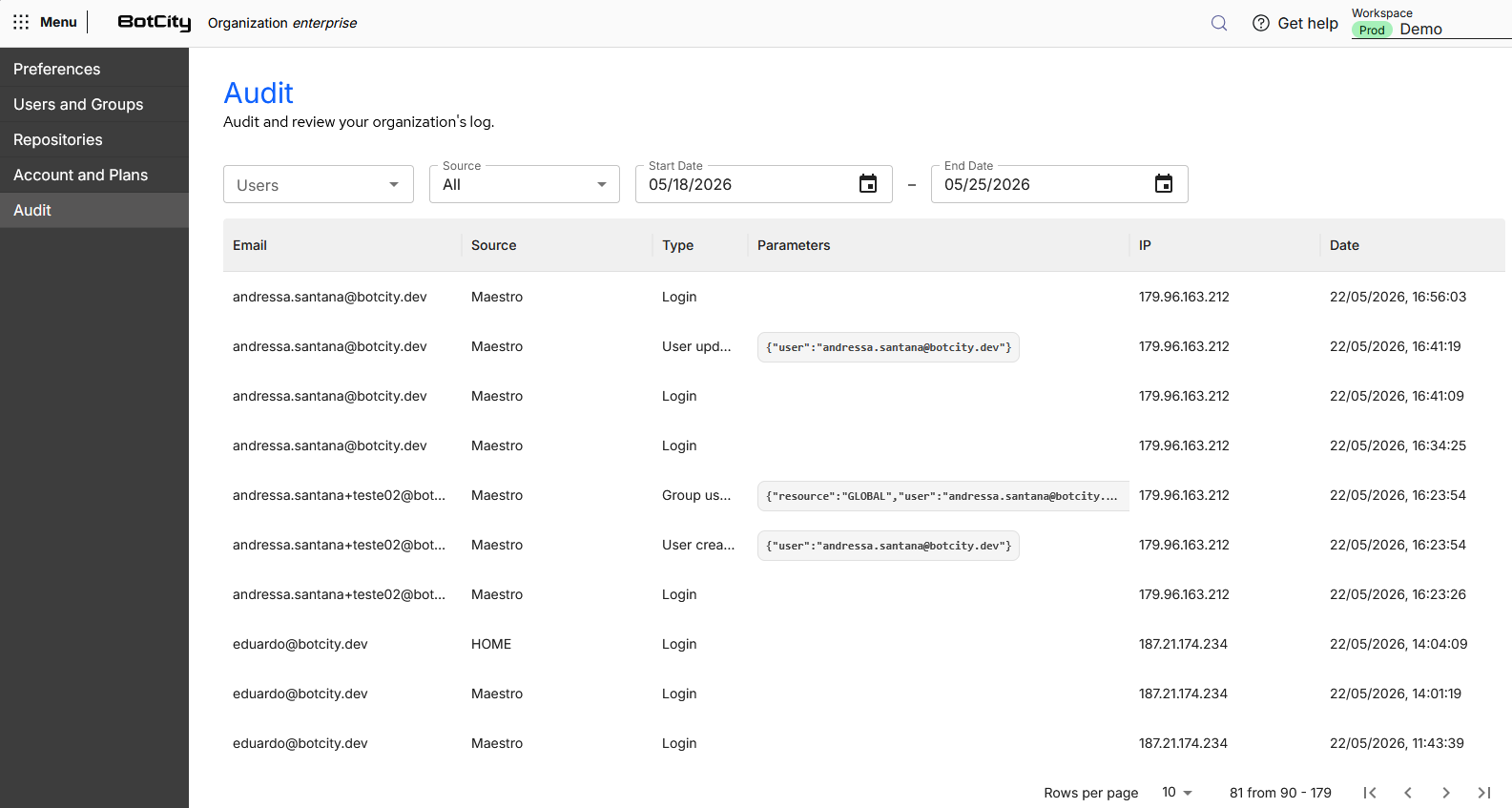
Improvement applied to the Audit Log functionality, integrating the IP address column into records of write actions performed by users within the platform, such as creation, editing, or deletion of resources (tasks, automations, machines, etc.). Read and query actions are outside the scope of logging.
This record raises the level of traceability for actions performed within the platform, covering stricter security policies.
Runner
The captured IP will always be from actions performed by human users — actions performed by Runners will not have their IPs recorded.
Observability
Update to BotCity Runner, version 3.5.0, with the ability to integrate observability resources to monitor, troubleshoot, and gain insights into automation performance, offering:
- Structured Logs: TEXT or JSON format with detailed contextual metadata
- OpenTelemetry Integration: Export logs to any OTLP-compatible backend
- Context Propagation via MDC: Consistent correlation between log entries
Observability Platforms
Direct support for BotCity Runner integration with platforms through OpenTelemetry, without the need for an intermediate collector:
- Dynatrace: full-stack observability with AI-driven analysis.
- New Relic: unified observability with powerful queries via NRQL.
- Datadog: comprehensive monitoring with log analysis and APM correlation.
- Grafana Cloud: open-source-based observability, with Loki for logs.
OpenTelemetry Collector
Deploy an OpenTelemetry Collector as an intermediary for advanced scenarios:
- Routing to multiple destinations: send logs to multiple backends simultaneously
- Data transformation: enrich, filter, or redact log data
- Buffering: handle network interruptions resiliently
- Credential management: keep API keys in the collector, not in the Runner
Session Manager
Update to BotCity Session Manager, version 1.3.0, adding the Bypass interactive login parameter, enabling automatic navigation through interactive login screens.
Bug Fixes and Improvements
Bug Fixes
-
Users dropdown on the groups screen with two scrollbars On the Groups screen, the dropdown for adding users to a group displayed two simultaneous scrollbars, but only one worked correctly — the user could not view the complete list. Fixed so that the scroll works in a unified manner, allowing navigation through the entire list.
-
Scheduling screen displaying mixed PT and EN text The Scheduling screen displayed text in Portuguese and English mixed in the same interface, creating language inconsistency for the user. Fixed so that the displayed language is consistent with the language configured on the account.
-
Responsiveness issue in DataPool The Data Pool screen had layout issues at certain resolutions, with elements cut off or mispositioned. Fixed the responsive behavior so that the interface adapts correctly to different screen sizes.
-
"X" button displayed incorrectly in the date filter In the date filter, the "X" clear button was visible even when the filter was at its default value, creating confusion for the user. Fixed behavior: the X is hidden on the default date chip; when loading the page, the chip displays the range without the clear button; if the user applies additional filters, the "Clear filters" button appears normally.
Improvements
-
Search in orchestrator filters Added a search field ("Search") inside the filter dropdowns on all Orchestrator screens that did not yet have this functionality: Robots, Schedules, Credentials, Tasks, Datapool, New Task, Execution Log, Runners, and Automations. The search works in real time on the client, without a new backend call. Filters with short, fixed lists (such as state) do not receive the field. If no results are found, it displays "No results found".
-
Selection filters load in the background On the New Task screen, the request that lists all Robots for filters had a high response time and blocked the loading of the entire page. Now the filters load in the background while the main content is already displayed. The filter now displays two new states: "Loading" (while options are still arriving) and "Empty" (when no options are available). All screens using the FilterBar component with API-based filters have been updated.
-
Zoho integration within the product Zoho (support channel) has been embedded directly within the product, replacing HubSpot. Users can access Zoho without leaving the platform, ensuring a smoother support and service experience.
-
Release flow restructuring Internal restructuring of the frontend release generation process. An improvement that impacts the agility and reliability of the platform's new version publishing process.
-
Input sanitization Improvement applied to input fields and critical metadata, limiting characters.