My Information
In the My information menu you view and edit your account data on the BotCity Platform, set the display language, view your roles in the workspace, and change your password.
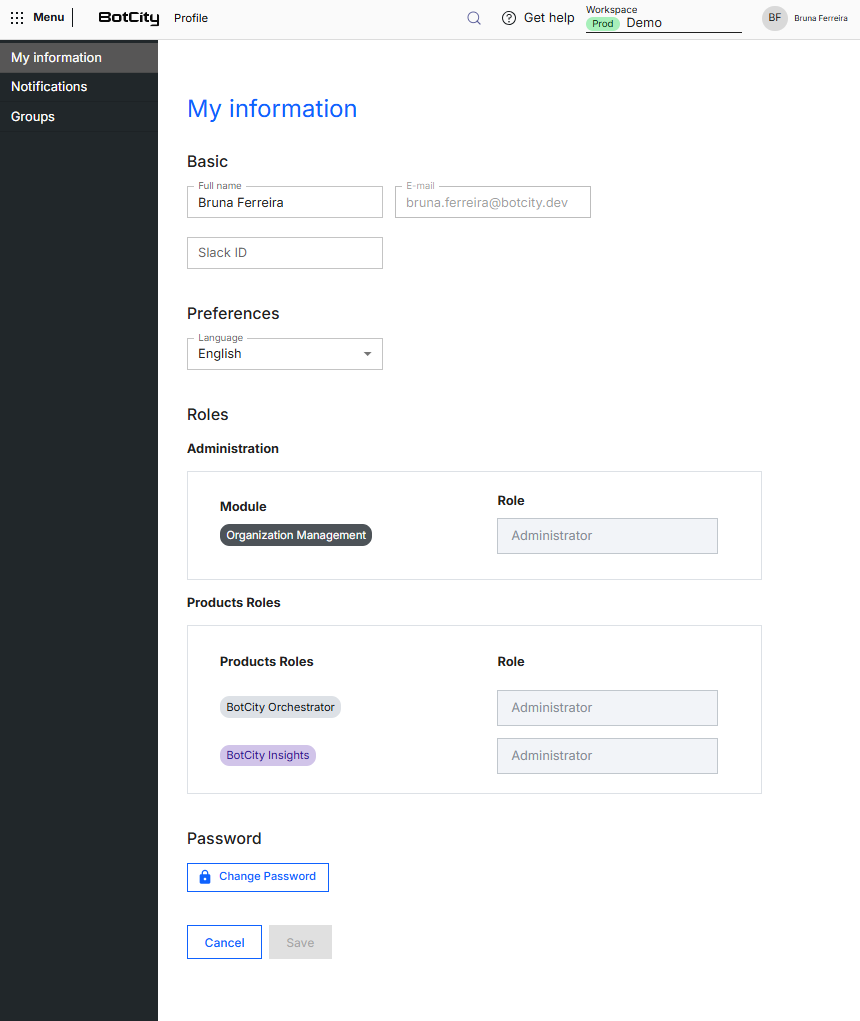
Basic
Brings together your account's identification data:
- Full name: display name of the user on the platform.
- E-mail: e-mail address used to access the platform and receive notifications. This field cannot be changed.
- Slack ID: Slack user or channel identifier.
Receive alerts on Slack
The Slack ID is used together with the Slack Bot Token so the Orchestrator sends event alerts, such as task completion, reported errors, and Runner offline, to your Slack user or channel.
See more at:
Preferences
- Language: language in which the platform is displayed for you.
Roles
Shows the roles assigned to you in the current workspace. On this page, roles are available for viewing only:
- Administration: role in each administration module of the workspace:
Organization
- Products Roles: role in each contracted product:
BotCity OrchestratorBotCity Insights
Change roles
Roles are set by a user with the Administrator role in the Organization, in the Users and Groups menu.
See more at:
Password
To set a new access password, click the Change Password button.
Organization password policy
The rules for the new password depend on the security policy adopted by your organization.
See more at:
Save changes
After editing the data, click Save to confirm. To discard the changes, click Cancel.